



- Acessórios de Fibra
- Adaptador-conectores-couplers
- Alicate - Tesoura
- Atenuador
- bandeja para fibra ótica
- Cabinet rack network
- Cabos de Fibra
- Caixa de Atendimento
- Caixa de Emenda
- Caixa de Terminaçâo
- Clean - Limpeza
- Cleaver - Clivador
- Cortador De Fibra
- Dio - Distribuidor interno Otico
- Ferramentas - Tools
- Fibra Switch
- Fonte
- Fonte para Olt
- Fusion - Máquina De Fusão
- HDMI Extender
- Media Converter - Conversor De Midia
- Microscopio Inspector
- Modulo Sfp/xfp
- Olt e Placas Fiberhome
- Onu Epon
- Onu-Gepon-Gpon
- Organizador de cabos
- OTDR - Power Meter - Medidores
- PACPON POE REVERSE
- Patch Cord - Cordão Óptico
- Splitter
- Gabinete
- Cadeira Gamer
- Hard Disk
- Hd Externo
- Hd Para Notebook
- Headphone
- Impressora 3D
- Impressora Etiquetadora
- Impressoras Jato De Tinta
- Impressoras Laser
- Leitor Biometrico
- Memoria
- Cpu
- Monitor
- Mouse
- Notebook
- Ups- Nobreak
- Pen Drive
- Power Bank - Carregador Simultaneo
- Leitor Biometrico
- Teclado
- Ventiladores
- Vga
- Zebra
- Triturador De Papel
- Acessorios
- Air Live
- Aparelho De Surdez
- Apricorn
- Ar Condicionado
- Atenuador
- Automacao Resid/comercial
- Cabo
- Cadeira Gamer
- Caixa Optica-gabinete- Odf
- Cambium Networks
- Cameras
- Combo Wifi
- Contador De Cedulas
- Cpu
- Dermaroller
- Energia Solar E Eolica
- Estabilizadores / Nobreak
- Carregamento Solar
- Ezviz
- Fanvil
- Fechadura Digital
- Ferramentas- Maquinas Para Construção
- Fibra Optica / Fibra Otica
- Fontes
- Gabinete
- Grandstream
- Hard Disk Ide - Sata
- Hard Diskk
- Hd Externo
- Hd Para Notebook
- Hd Sas
- Hd Ssd
- Headphone
- Hikvision
- Huawei
- Hub/switch
- Impressora 3d
- Impressora Etiquetadora
- Impressoras Jato De Tinta
- Impressoras Laser
- Incendio
- Iptv
- Joystick
- Kaiser Baas
- Kit- Gabinete
- Leitor Biometrico
- Mb
- Memoria
- Mercusys
- Mimosa Networks
- Modulo Mux Demux
- Monitor
- Mouse
- Mux-demux
- Notebook
- Pen Drive
- Poe
- Poe - Injectores
- Porta Retrato Digital
- Power Bank - Carregador Simultaneo
- Produtos De Estetica
- Radio Digital
- Receptor Via Satelite
- Router Wi
- Scanner
- Secadores De Mão
- Servidor
- Teclado
- Tp-link
- Triturador De Papel
- Ups- Nobreak
- Ventiladores
- Vga
- Voip/goip/gateway
- Zebra

 Informações do Produto
 Verifique a disponibilidade com seu vendedor
W. CONECTOR EXTERNO P/ PIGTAIL RJ45-FT
Código: 29365
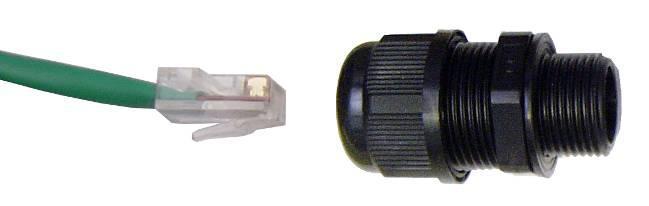
 clique na imagem para ampliar
u$ 6,00
Itens relacionados


http://www.pacwireless.com/products/RJ45-ECS_instructions.pdf
Instruction Sheet
Step 1: Prepare enclosure by drilling a 20mm (0.787”) hole in the
enclosure. Install RJ45 housing into enclosure. The rubber gasket should be
on the outside of the enclosure to insure proper sealing.
Step 2: Remove the thin enclosure nut from the feedthru assembly. This
can be discarded. Loosen the compression nut completely.
Step 3: Insert the RJ45 connector thru the feedthru assembly
Step 4: Tighten the compression nut loosely
Step 5: Screw the entire feedthru assembly into the RJ45-ECS housing
which is already mounted in the enclosure. There should be a rubber gasket
between the two assemblies. Tighten the feedthru assembly to create a seal.
Step 6: The final step is to tighten the compression nut until the gaskets are
tight around the Cat5 cable. Always push the cable toward the connector
while tightening to ensure good strain relief of cable to connector
Disassembly
Step 1: Loosen the compression nut to relieve pressure on the Cat5 cable
Step 2: Unscrew the feedthru assembly from the RJ45-ECS housing
Step 3: Using a small screwdriver depress the RJ45 bayonet lock to release
the RJ45 connector from the socket
Specifications
Data
10BaseT, 100BaseT and 1000BaseT Networks
CAT5e per TIA/EIA 568B
ClassD per ISO/IEC 11801
Mechanical
Mating Cycles >500
Positive RJ45 bayonet coupling
Cat5 Cable Strain Relief
Sealing IP67
Salt Spray >1000h
Flammability UL94VO
Thermal Shock 10 cycles -40 to +100 deg C
Temperature Range -40 deg C to +85 deg C
Installation Hole Dia 0.787” (20mm)
Overall Size (L x Dia) 3.75” x 1.18”
(95 x 30mm)
Weight 2 oz (57gm)
Instruction Sheet
Step 1: Prepare enclosure by drilling a 20mm (0.787”) hole in the
enclosure. Install RJ45 housing into enclosure. The rubber gasket should be
on the outside of the enclosure to insure proper sealing.
Step 2: Remove the thin enclosure nut from the feedthru assembly. This
can be discarded. Loosen the compression nut completely.
Step 3: Insert the RJ45 connector thru the feedthru assembly
Step 4: Tighten the compression nut loosely
Step 5: Screw the entire feedthru assembly into the RJ45-ECS housing
which is already mounted in the enclosure. There should be a rubber gasket
between the two assemblies. Tighten the feedthru assembly to create a seal.
Step 6: The final step is to tighten the compression nut until the gaskets are
tight around the Cat5 cable. Always push the cable toward the connector
while tightening to ensure good strain relief of cable to connector
Disassembly
Step 1: Loosen the compression nut to relieve pressure on the Cat5 cable
Step 2: Unscrew the feedthru assembly from the RJ45-ECS housing
Step 3: Using a small screwdriver depress the RJ45 bayonet lock to release
the RJ45 connector from the socket
Specifications
Data
10BaseT, 100BaseT and 1000BaseT Networks
CAT5e per TIA/EIA 568B
ClassD per ISO/IEC 11801
Mechanical
Mating Cycles >500
Positive RJ45 bayonet coupling
Cat5 Cable Strain Relief
Sealing IP67
Salt Spray >1000h
Flammability UL94VO
Thermal Shock 10 cycles -40 to +100 deg C
Temperature Range -40 deg C to +85 deg C
Installation Hole Dia 0.787” (20mm)
Overall Size (L x Dia) 3.75” x 1.18”
(95 x 30mm)
Weight 2 oz (57gm)

























-
Todos os produtos que comercializamos estão disponíveis na
lista de preços. não garantimos estoque. Recomendamos averiguar com nossos vendedores.
Ir para o atendimento
- Como Recuperar Dispositivos MikroTik com Netinstall
- MARSRIVA: uma empresa de engenharia que segue os padrões internacionais de qualidade da ISO 9001
- Terminal de Reconhecimento Facial DS-K1T671 Hikvision na Globo
- Nova cota de U$ 1000: veja o que da pra trazer do exterior para o Brasil
- [Vídeo] Montagem de rack - Iuron
- Atualização de SEGURANÇA das câmeras Hikvision
- Vulnerabilidade CGI em roteadores TP-Link. O que fazer?
- ALERTA DE GOLPE: Pessoa de passando por funcionário Flytec no WhatsApp
- [ATUALIZAÇÃO] Como fazer IMPORTAÇÃO de produtos
- ALERTA DE GOLPE: Uso indevido da marca Flytec por Flythec e Flythec Eletronicos
- Torne-se um especialista em UniFi em 15 minutos
- Guia Passo a Passo para Redes WiFi para Eventos
- [Vídeo] Qual o AP UniFi Ideal em Cada Tipo de Aplicação?
- Como fazer IMPORTAÇÃO de produtos
- Guia de Rádios Ubiquiti
- Orçamentos para Projetos de Painel Solar
- [Vídeo] Lucre com WiFi Premium usando UniFi como serviço
- [Vídeo] Entregando MUITA banda com rádios AirMAX AC
- [Vídeo] OLT UBIQUITI, ONT QUE PASSA 900 MEGAS - LOUCOS DA TELECOM
- Atualização dos firmwares USG-Pro-4 e ER-8
- Energia solar: Qual a diferença entre sistemas On-grid e Off-grid?
- Conheça o controlador UNMS da Ubiquiti
- ALERTA: Não vendemos no SUBMARINO, AMERICANAS ou em qualquer site do Brasil
- Software MIMOSA 2.3.3 já disponível
- ENTENDA AS CARACTERÍSTICAS DOS SWITCHES HUAWEI CONFORME A NOMENCLATURA
- Ver todas as notícias

 ATENÇÃO: Não fazemos entregas no Brasil. Retirar na loja.
